# Instalação e rede

questões de instalação, manutenção da instalação e mapeamentos

# Instalação dos sistemas


# Mapeamento


# Central de operações


# Atualização dos sistemas

<span style="font-size: 12pt; font-family: Roboto,sans-serif; color: #000000; background-color: transparent; font-weight: 400; font-style: normal; font-variant: normal; text-decoration: none; vertical-align: baseline; white-space: pre-wrap;">1 - Acesse o menu </span><span style="font-size: 12pt; font-family: Roboto,sans-serif; color: #000000; background-color: transparent; font-weight: bold; font-style: normal; font-variant: normal; text-decoration: none; vertical-align: baseline; white-space: pre-wrap;">Utilitários &gt; Ferramentas do sistema &gt; Acesso aos sistemas neste momento</span><span style="font-size: 12pt; font-family: Roboto,sans-serif; color: #000000; background-color: transparent; font-weight: 400; font-style: normal; font-variant: normal; text-decoration: none; vertical-align: baseline; white-space: pre-wrap;"> para confirmar que não há nenhum usuário utilizando o sistema no momento, caso haja, solicite que o logoff seja realizado</span>

<span style="font-size: 12pt; font-family: Roboto,sans-serif; color: #000000; background-color: transparent; font-weight: 400; font-style: normal; font-variant: normal; text-decoration: none; vertical-align: baseline; white-space: pre-wrap;"> </span><span style="font-size: 12pt; font-family: Roboto,sans-serif; color: #000000; background-color: transparent; font-weight: 400; font-style: normal; font-variant: normal; text-decoration: none; vertical-align: baseline; white-space: pre-wrap;"><span style="border: none; display: inline-block; overflow: hidden; width: 332px; height: 334px;">![](https://lh7-us.googleusercontent.com/wpHT-gYLmveQl-l6sWMLT4rjKfwC3Cy-s78Vyu3BHHhLvEkP2kDnyhPXRNdODrEEMDyY9ulyyabAbr2GZMybOmHZGqqzReYgzL2uQXeDIdHr7l6CRyiVywxWcTBnR_3dGHyMCPEHkIt4heVoVXHmy8k)</span></span>

<span style="font-size: 12pt; font-family: Roboto,sans-serif; color: #000000; background-color: transparent; font-weight: 400; font-style: normal; font-variant: normal; text-decoration: none; vertical-align: baseline; white-space: pre-wrap;">2 - Após isso é extremamente importante realizar a cópia de segurança do banco de dados, para isso, acesse o menu </span><span style="font-size: 12pt; font-family: Roboto,sans-serif; color: #000000; background-color: transparent; font-weight: bold; font-style: normal; font-variant: normal; text-decoration: none; vertical-align: baseline; white-space: pre-wrap;">Utilitários &gt; Ferramentas do Sistema &gt; Cópia de Segurança.</span>

<span style="font-size: 12pt; font-family: Roboto,sans-serif; color: #000000; background-color: transparent; font-weight: 400; font-style: normal; font-variant: normal; text-decoration: none; vertical-align: baseline; white-space: pre-wrap;"><span style="border: none; display: inline-block; overflow: hidden; width: 414px; height: 342px;">![](https://lh7-us.googleusercontent.com/PxA_Ry5yb6DZZbj60kNyAk3tv8OCW_Bn-fW_2z9X8MVS0qVAWs84ZnNbihbQrynXzaM5mdI6Gokbltk-ysRij-MOvpwZ5-XBAImd60gHeWOUqC-64lu504G39LWXHha_kxi1tdnP5p13RnvnTuqowbo)</span></span>

<span style="font-size: 12pt; font-family: Roboto,sans-serif; color: #000000; background-color: transparent; font-weight: 400; font-style: normal; font-variant: normal; text-decoration: none; vertical-align: baseline; white-space: pre-wrap;">A cópia será salva na pasta indicada como diretório,</span><span style="font-size: 12pt; font-family: Roboto,sans-serif; color: #000000; background-color: transparent; font-weight: bold; font-style: normal; font-variant: normal; text-decoration: none; vertical-align: baseline; white-space: pre-wrap;"> lembre-se de verificar se está marcada a opção "Todas as Empresas" </span>

<span style="font-size: 12pt; font-family: Roboto,sans-serif; color: #000000; background-color: transparent; font-weight: bold; font-style: normal; font-variant: normal; text-decoration: none; vertical-align: baseline; white-space: pre-wrap;"><span style="border: none; display: inline-block; overflow: hidden; width: 484px; height: 368px;">![](https://lh7-us.googleusercontent.com/gn70_4Xk_KxWKIkTSDIh9qPJCdTmzojtPmLk7S-OZnRBpiKGFcazlPsxW3oCTlfSmHpbIt-aqJCrpXnqXd4jfQc4F-9WlfNGtP2sYF9aGCX2Uyno_RVWAknMjpSMYS3dnABeoa3M3OKsbKLeXHy3Aeo)</span></span>

<span style="font-size: 12pt; font-family: Roboto,sans-serif; color: #000000; background-color: transparent; font-weight: 400; font-style: normal; font-variant: normal; text-decoration: none; vertical-align: baseline; white-space: pre-wrap;">3 - A Central de Operações será executada e seu ícone ficará na barra de ferramentas do Windows, perto do relógio no canto inferior direito:</span>

<span style="font-size: 12pt; font-family: Roboto,sans-serif; color: #000000; background-color: transparent; font-weight: 400; font-style: normal; font-variant: normal; text-decoration: none; vertical-align: baseline; white-space: pre-wrap;"><span style="border: none; display: inline-block; overflow: hidden; width: 376px; height: 161px;">![](https://lh7-us.googleusercontent.com/8j4A3iGfgWf_qvWV4rTP99lQrx4WuJdax5W3nqDzEzvwW2eOrOxPrtlNILDA8v2cYFBfZepYFgkstrIVv8Rp65Zw_H6Ml4ExVtpY9nC5A9jgjFMqBceRF6LLdKehjdB2fA48oZI2H_Hg5aVUMdL8aiE)</span></span>

<span style="font-size: 12pt; font-family: Roboto,sans-serif; color: #000000; background-color: transparent; font-weight: 400; font-style: normal; font-variant: normal; text-decoration: none; vertical-align: baseline; white-space: pre-wrap;">3.1 - Para acessar a Central de Operações clique no ícone com o botão direito e após isso em “Abrir”</span>

<span style="font-size: 12pt; font-family: Roboto,sans-serif; color: #000000; background-color: transparent; font-weight: 400; font-style: normal; font-variant: normal; text-decoration: none; vertical-align: baseline; white-space: pre-wrap;"><span style="border: none; display: inline-block; overflow: hidden; width: 186px; height: 109px;">![](https://lh7-us.googleusercontent.com/JgeGBSrN6lAXUHDJcqKyvp0oTnmOzwo9Xal_r2ertrePDTmj9CAfJ24GbXQ437V7j_zF6pRhW-oPq8BIUAG9-vC20zT_jbwEiyxUQGduSLU5JBMidreYS7N5Inuwr-qhz0K-D5hOIYzkvFDWW3OVj54)</span></span>

<span style="font-size: 12pt; font-family: Roboto,sans-serif; color: #000000; background-color: transparent; font-weight: 400; font-style: normal; font-variant: normal; text-decoration: none; vertical-align: baseline; white-space: pre-wrap;">3.2 - Se necessário informe o CNPJ/CPF do Contrato da Empresa e a Senha do Contrato se necessário, em seguida clique em Acessar</span>

<span style="font-size: 12pt; font-family: Roboto,sans-serif; color: #000000; background-color: transparent; font-weight: 400; font-style: normal; font-variant: normal; text-decoration: none; vertical-align: baseline; white-space: pre-wrap;"><span style="border: none; display: inline-block; overflow: hidden; width: 295px; height: 447px;">![](https://lh7-us.googleusercontent.com/V9gtrMIR0pvUbBCcKjLnYx2FDcXxy02ucP_Hm11PWrN7PcCTm8t_w3nGnCMZvVB7PKR4hepHJHwcJ2S_5-eYwYKNBYLeZjxlBOgWnOuiuJtSW0jhD-MRGfyenLPNuyFTzBG-aOBfhiLZT8dYSbtTQbY)</span></span>

<span style="font-size: 12pt; font-family: Roboto,sans-serif; color: #000000; background-color: transparent; font-weight: 400; font-style: normal; font-variant: normal; text-decoration: none; vertical-align: baseline; white-space: pre-wrap;">4 - Selecione os módulos que deseja atualizar e clique em “Baixar agora”</span>

<span style="font-size: 12pt; font-family: Roboto,sans-serif; color: #000000; background-color: transparent; font-weight: 400; font-style: normal; font-variant: normal; text-decoration: none; vertical-align: baseline; white-space: pre-wrap;"><span style="border: none; display: inline-block; overflow: hidden; width: 548px; height: 410px;">![](https://lh7-us.googleusercontent.com/5yL304Fj9qgPjFE5h_1v965CE8mxNPpZ-QGKjzDLI473lEOsD7qJA_9zrtXBEp-EHOIVXy5hAj1LXYALqgr0ZLgtxwbGorXJQS8tx_m0Fm-HE8YB7ZKbBUeZr1AbTeOP03znWhPlAaFEjQvsrVd-Rhw)</span></span>

<span style="font-size: 12pt; font-family: Roboto,sans-serif; color: #000000; background-color: transparent; font-weight: 400; font-style: normal; font-variant: normal; text-decoration: none; vertical-align: baseline; white-space: pre-wrap;">Após irá iniciar o download:</span>

<span style="font-size: 12pt; font-family: Roboto,sans-serif; color: #000000; background-color: transparent; font-weight: 400; font-style: normal; font-variant: normal; text-decoration: none; vertical-align: baseline; white-space: pre-wrap;"><span style="border: none; display: inline-block; overflow: hidden; width: 641px; height: 49px;">![](https://lh7-us.googleusercontent.com/lq8i_dgAqKTpqedSW2ApvnDe2EKFp9hGrc8ISMYOyQ7hqFC2knmiuWygedbPdzANpS72ruwJ_k4D32btmRuI9c671Tvzs71MpdJh0JIvlPM1L4IB-mpRKMyOsxA8xc8xYfdzYGuTyzoXnYKFghyKha4)</span></span>

<span style="font-size: 12pt; font-family: Roboto,sans-serif; color: #000000; background-color: transparent; font-weight: 400; font-style: normal; font-variant: normal; text-decoration: none; vertical-align: baseline; white-space: pre-wrap;">quando finalizar irá ficar desta forma:</span>

<span style="font-size: 12pt; font-family: Roboto,sans-serif; color: #000000; background-color: transparent; font-weight: 400; font-style: normal; font-variant: normal; text-decoration: none; vertical-align: baseline; white-space: pre-wrap;">5 - clique no ícone de “play” para abrir o sistema</span>

<span style="font-size: 12pt; font-family: Roboto,sans-serif; color: #000000; background-color: transparent; font-weight: 400; font-style: normal; font-variant: normal; text-decoration: none; vertical-align: baseline; white-space: pre-wrap;"><span style="border: none; display: inline-block; overflow: hidden; width: 641px; height: 29px;">![](https://lh7-us.googleusercontent.com/Pmbc23UWAClwas44yus6dyCOR_isSjvkCcYWYI936tSJef3Qegfv9kophBkgK61lgRX9LBOTcCEEsYB-XWuCP5xujBl5j0vY-l2BNytDFmDQ60_chWFvuJyzSCjEm3mvOaqxa298Mj0sK79wtAPd5Y0)</span></span>

<span style="font-weight: normal;">  
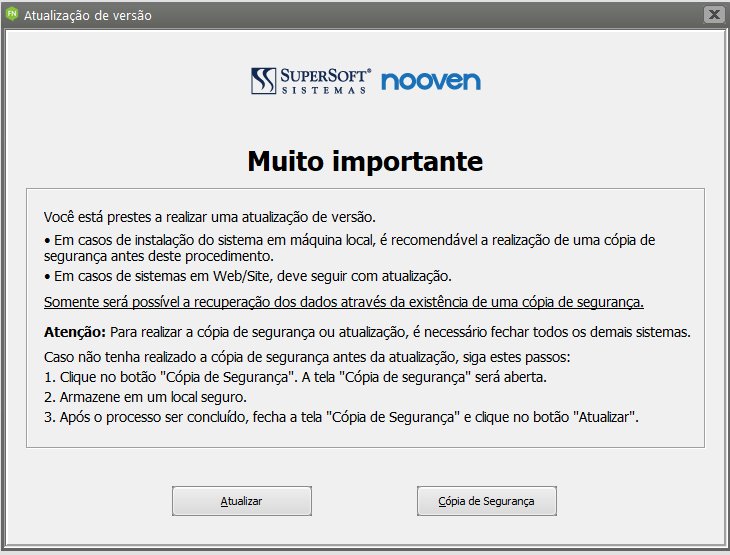
<span style="font-size: 12pt; font-family: Roboto, sans-serif; color: rgb(0, 0, 0); background-color: transparent; font-weight: 400; font-style: normal; font-variant: normal; white-space-collapse: preserve;">Aparecerá o lembrete da cópia de segurança</span></span>

<span style="font-weight: normal;"><span style="font-size: 12pt; font-family: Roboto, sans-serif; color: rgb(0, 0, 0); background-color: transparent; font-weight: 400; font-style: normal; font-variant: normal; white-space-collapse: preserve;">5 - como a cópia foi realizada antes da instalação da versão pode clicar em “Atualizar”</span></span>

<span style="font-weight: normal;"><span style="font-size: 12pt; font-family: Roboto, sans-serif; color: rgb(0, 0, 0); background-color: transparent; font-weight: 400; font-style: normal; font-variant: normal; white-space-collapse: preserve;"><span style="border-width: initial; border-style: none; display: inline-block; overflow: hidden; width: 561px; height: 427px;">![](https://lh7-us.googleusercontent.com/Moe8YERfB7jsLGLcC9k_VRwB8FMMBx8lD2ui82lACHWSZZw25SOuRvYNXO0maLmiJERgrPAFo_Au55C1qqbMPfGWpwChTWXC1fsTiONkZ1lBTJCixeuiqmznTep97b23z_EhWn0HgeMA4nrAvF2u4OA)</span></span></span>